
Agent Tenure refers to the length of time an agent has been active within your organization or onboarded on Convin. This helps you segment performance insights based on how long agents have been working — for example, newly onboarded agents vs. experienced agents.
Steps on how to Use Agent Tenure Filter on Overall Dashboard:
- Navigate to Home Page.

- Locate to Advanced Filters.

- Locate and Select Agent Tenure Filter.
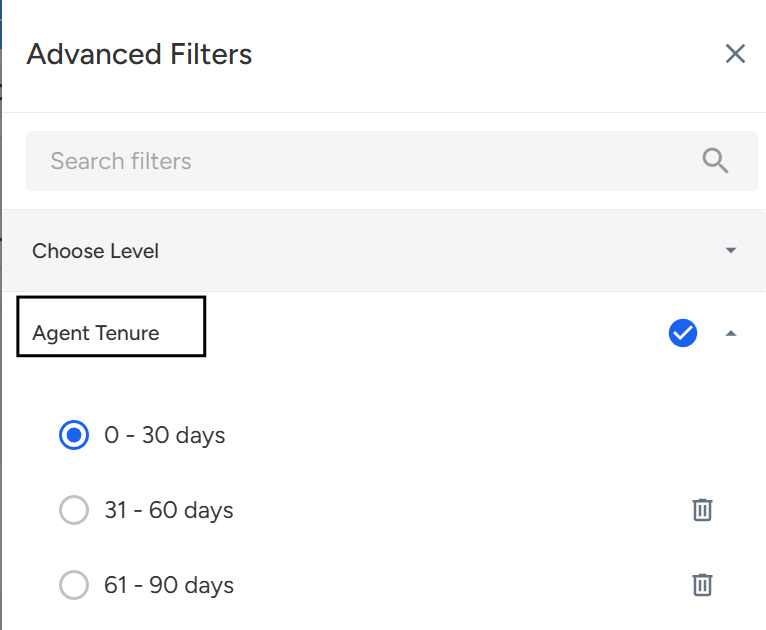
Choose the desired tenure range (e.g., 0–30 days, 31–60 days, 61+ days) to view data segmented accordingly. - Click Apply Filters to refresh your dashboard and view insights based on selected tenure.
Steps on how to Use Agent Tenure Filter on Overall Dashboard:
- Navigate to Conversation Page.

- Locate to Advanced Filters.

- Locate and Select Agent Tenure Filter.
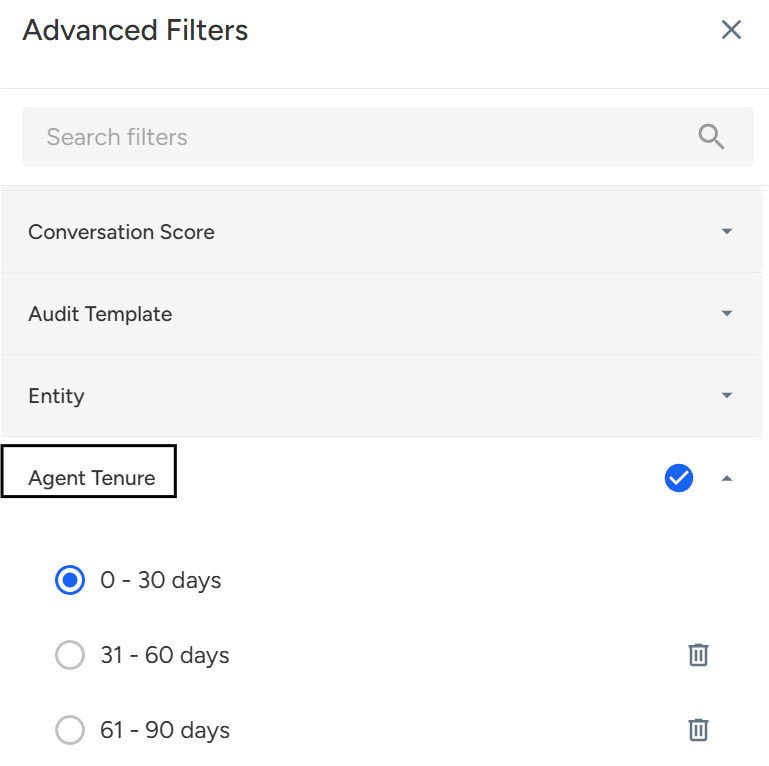
Choose the desired tenure range (e.g., 0–30 days, 31–60 days, 61+ days) to view data segmented accordingly.
📩 Still need help? Contact our support team at [email protected]—we’re happy to assist!
Good day!