
Campaign Status
The Campaign Status filter helps you view and manage campaigns based on their current lifecycle stage.
How to Navigate
From the left sidebar, click Campaigns.
At the top of the Campaigns page, find the blue filter labeled Campaign Status (by default, it shows Active).
Click it to open the dropdown list.
Choose the required status to view campaigns that match it.
Use Clear Filters to remove any applied filters and view all campaigns again.
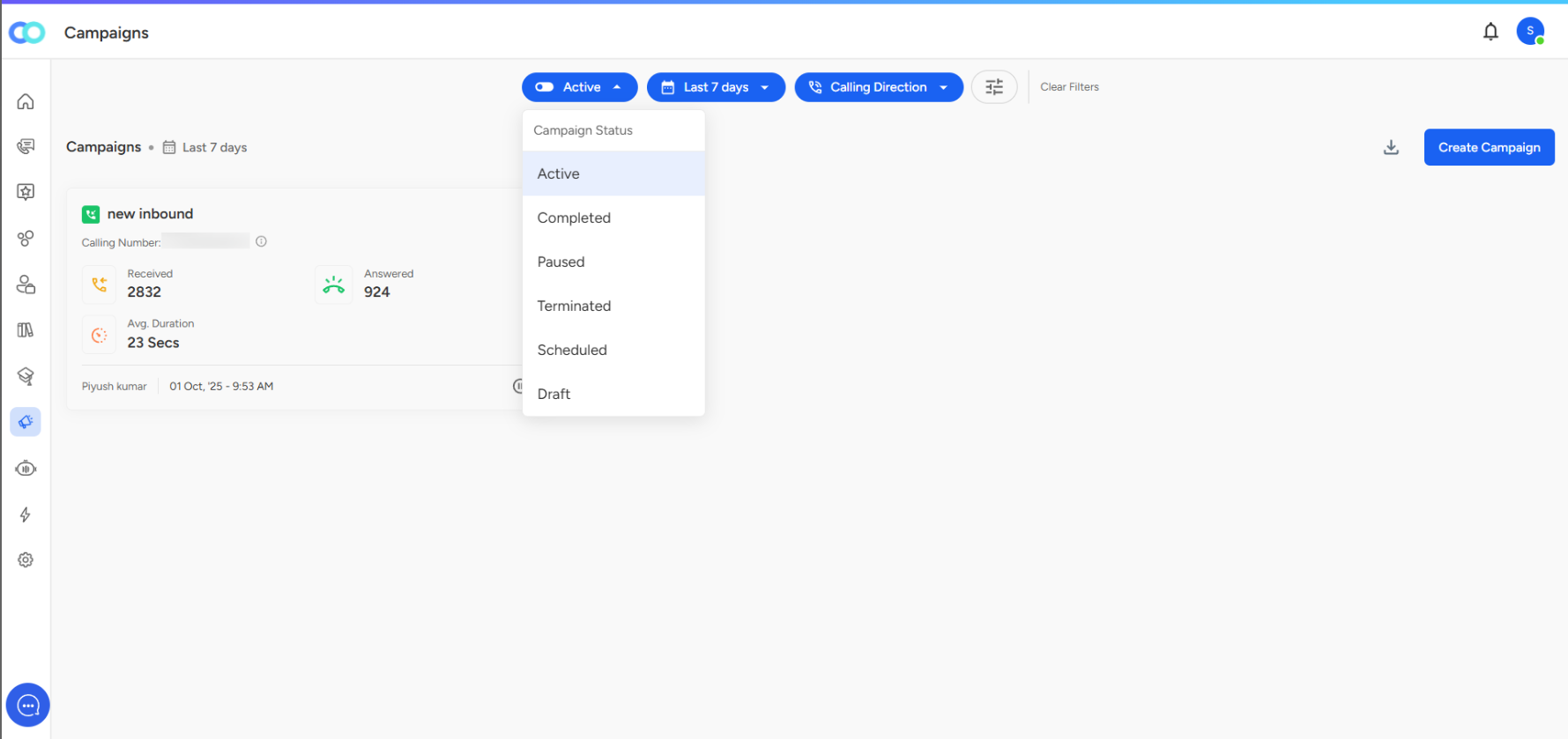
Campaign Status Types
Active
Campaigns that are currently running and receiving or making calls.
Use to: Monitor live performance metrics like received and answered calls.
Completed
Campaigns that have finished their scheduled duration.
Use to: Review overall performance and generate post-campaign reports.
Paused
Campaigns that are temporarily stopped.
Use to: Suspend activity for maintenance or review. Can be resumed later.
Terminated
Campaigns that were ended before completion.
Use to: Indicate campaigns that were stopped permanently.
Scheduled
Campaigns set to start at a future time.
Use to: Plan and track upcoming campaigns.
Draft
Campaigns saved but not yet scheduled or launched.
Use to: Review configuration details before final launch.
Quick Workflow Examples
To monitor live campaigns: Select Active.
To check past completed campaigns: Select Completed.
To review upcoming campaigns: Select Scheduled.
📩 Still need help?
Contact our support team at [email protected]—we’re happy to assist! Good day!