
Campaign Start Date: Quick Navigation Guide
What Is It?
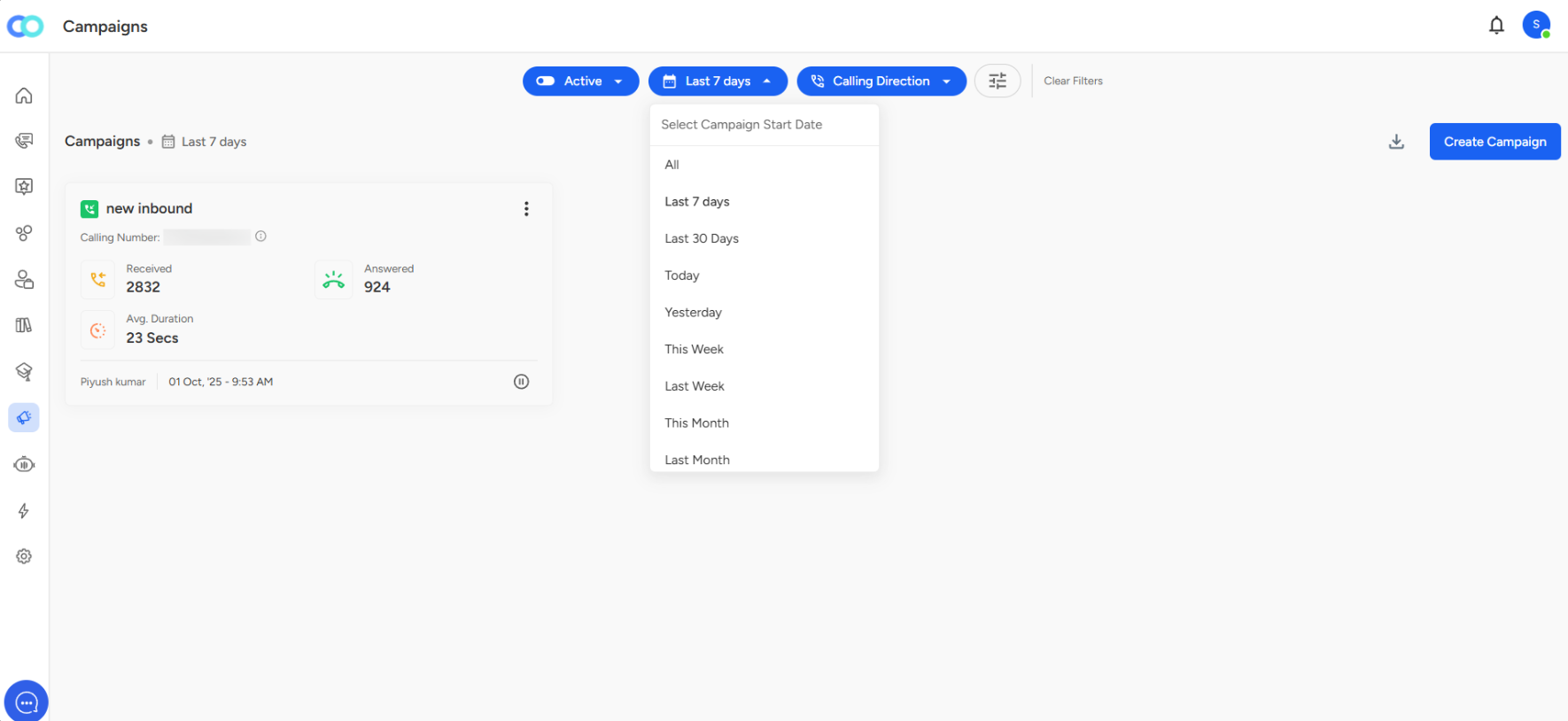
The Campaign Start Date filter helps you view campaigns based on when they were launched. It's the date dropdown button (showing "Last 7 days") at the top of your Campaigns page.
How to Use It
Step 1: Click the date filter button (middle button with calendar icon)
Step 2: Select from the dropdown options:
- All
- Last 7 days / Last 30 Days
- Today / Yesterday
- This Week / Last Week
- This Month / Last Month
Step 3: Your campaign list updates instantly to show only campaigns from that period
Key Benefits:
Performance Tracking: Compare new vs. old campaigns quickly
Stay Organized: Focus on recent campaigns without clutter
Quick Reporting: Pull data for specific timeframes for meetings
Trend Analysis: Spot patterns by reviewing monthly or weekly campaigns
Better Management: Identify campaigns that need attention based on age
📩 Still need help? Contact our support team at [email protected]—we’re happy to assist!
Good day!