
How to Navigate to Advanced Filters: Step-by-Step Guide
Accessing Advanced Filters
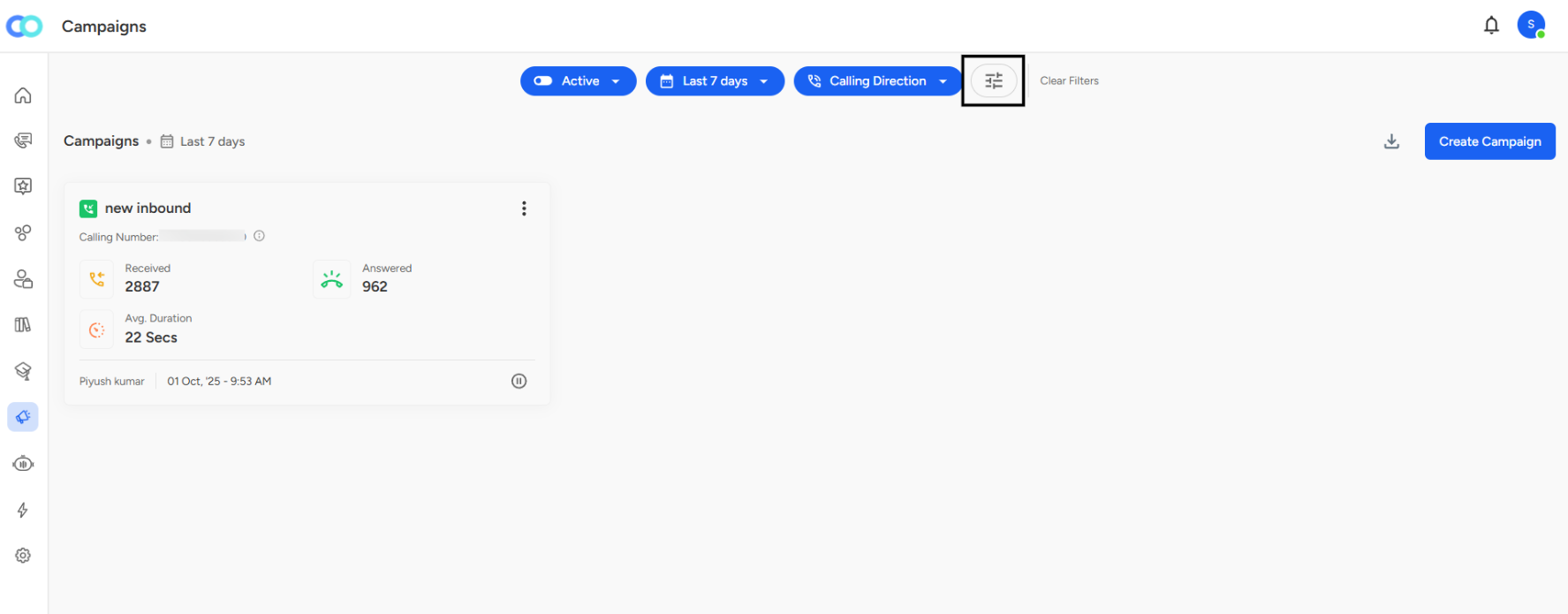
Step 1: Locate the Filter Icon
On the Campaigns page, look at the top filter bar where you see buttons like "Active," "Last 7 days," and "Calling Direction."
Step 2: Click the Advanced Filters Icon
Find the filter icon (looks like horizontal sliders or lines) next to the "Clear Filters" button on the right side of the filter bar.
Step 3: Advanced Filters Panel Opens
A side panel titled "Advanced Filters" slides in from the right side of your screen.
Campaign created date:

Campaign Created Date
Location:
Appears as the last section in the Advanced Filters panel.Purpose:
Filters campaigns by their creation date, allowing users to focus on a particular time period.Input Type:
A dropdown date selector labeled Campaign Created Date.
Usage:
Select a specific date or range to view campaigns launched during that period.
Ideal for trend analysis or performance tracking over time.
Analytical Value:
Enables time-based comparisons (e.g., monthly or quarterly performance).
Helps track the impact of new strategies or seasonal campaign launches.