
How to Pause a Campaign: A Complete Guide
Managing active campaigns requires flexibility and control. Sometimes you need to temporarily halt campaign activities without completely terminating them. Whether you're responding to unexpected circumstances, making adjustments, or simply need a break in operations, knowing how to pause a campaign is essential. Here's everything you need to know about pausing campaigns effectively.
How to Pause Your Campaign: Step-by-Step
Pausing a campaign is a straightforward process designed for quick action:
Step 1: Access Your Campaign Dashboard - Navigate to your campaigns list and select the active campaign you want to pause. The campaign will open showing its current status and performance metrics.
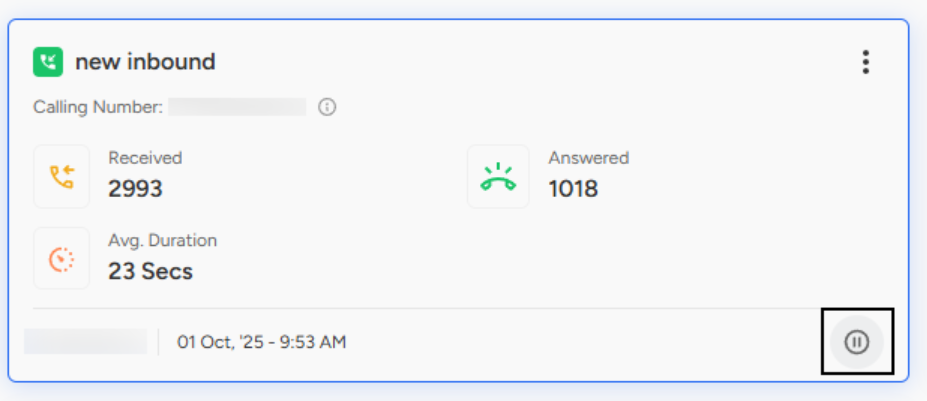
Step 2: Review Current Activity - Before pausing, take a moment to review the campaign's current state. Check metrics like received calls (2993 in the example), answered calls (1018), and average duration (23 seconds) to understand where you're stopping.
Step 3: Click the Pause Button - Locate the pause icon in the bottom-right corner of the campaign interface, marked by the distinctive two-bar pause symbol. Click this button to initiate the pause.
Step 4: Confirm the Action - Depending on your system configuration, you may see a confirmation dialog asking you to verify that you want to pause the campaign. This prevents accidental pauses that could disrupt operations.
Step 5: Verify Pause Status - Once paused, the campaign status should update to reflect its paused state. The pause button may transform into a resume or play button, indicating you can restart the campaign when ready.
What Happens When You Pause a Campaign?
Understanding the effects of pausing helps you make informed decisions:
Immediate Activity Cessation - All active campaign operations stop immediately. No new calls are initiated, no messages are sent, and agents are no longer directed to handle campaign-related tasks.
Preservation of Configuration - All your campaign settings remain intact, including agent assignments, calling numbers, activity hours, target customer lists, and all custom configurations.
Data Retention - Historical performance data is preserved. Your received calls, answered calls, duration statistics, and all other metrics remain accessible for analysis.
Agent Availability - Agents assigned to the paused campaign become available for other tasks or campaigns, optimizing resource utilization during the pause period.
Pause vs. Terminate: Understanding the Difference
It's crucial to distinguish between pausing and terminating campaigns:
Pausing is temporary and reversible. Use it when you intend to resume the campaign later with the same configuration. All settings and data are preserved, and you can restart with a single click.
Terminating is permanent and typically irreversible. Use it when the campaign has completed its purpose or needs to be completely shut down. While historical data may be retained for reporting, the campaign itself ends.
Think of pausing as pressing the pause button on a video—you can resume right where you left off. Terminating is like stopping the video entirely and ejecting the disc.
Resuming a Paused Campaign
When you're ready to restart your campaign, the process is equally simple:
Navigate back to your paused campaign in the dashboard. The pause button will now appear as a play or resume button. Click this button to reactivate the campaign. The system will immediately resume operations using all the preserved settings. Monitor the campaign closely after resuming to ensure everything restarts smoothly.
📩 Still need help? Contact our support team at [email protected]—we’re happy to assist!
Good day!