
All Insight View in Convin provides a unified, AI-powered overview of insights across conversations, teams, and agents. It helps Managers, Team Leads, Admins, and QA teams track performance, sentiment, and trends at both team and individual levels. Users can drill down into detailed metrics, identify improvement areas, and monitor key outcomes like CSAT, lead status, and deal progress. This view enables data-driven decision-making and efficient performance management.
Overview of All Insight View - AI Insights:
- Navigate to Convin Insight Page.

- Select AI Insights.

- Apply Filters:

Use the filters at the top to narrow down insights based on:Teams
Reps
Date Range
Duration
Additional filters
Insights will update instantly based on your selections.
- Explore Insight Cards.
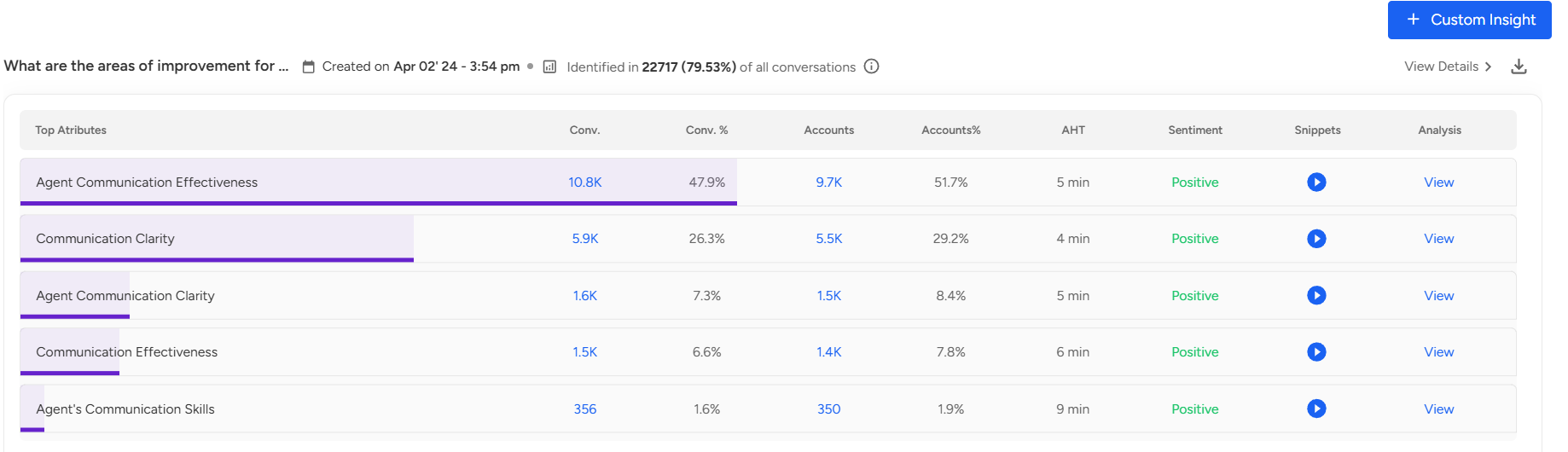
Each card shows:
Top attributes
Key metrics
Sentiment
Snippets
A “View Details” option to explore deeper insights
- A Download option to export detailed reports directly from the card
Notes / Uses:
Track performance trends across teams and agents.
Identify customer sentiment and satisfaction patterns.
Monitor lead status, deal outcomes, and collection effectiveness.
Access both high-level summaries and detailed insights for reporting or coaching.
📩 Still need help? Contact our support team at [email protected] —we’re happy to assist!
Good day!