
The Customer Intelligence dashboard in Convin provides a complete, AI-powered understanding of customer behaviors, conversation patterns, objections, product-related queries, competition mentions, and sentiment.
To make analysis easier, the dashboard is organized into six key insight categories, giving you a holistic view of your organisation’s conversational landscape.
You can explore insights in Single Insight View or Multiple Insights View based on your analysis needs.
Overview of All Insight View – Customer Intelligence:
- Navigate to Convin Insight Page.

- Select Customer Intelligence.

- Apply Filters:

Use the filters at the top to narrow down insights based on:Teams
Reps
Date Range
Duration
Additional filters
Insights will update instantly based on your selections.
- Explore Customer Intelligence Cards.
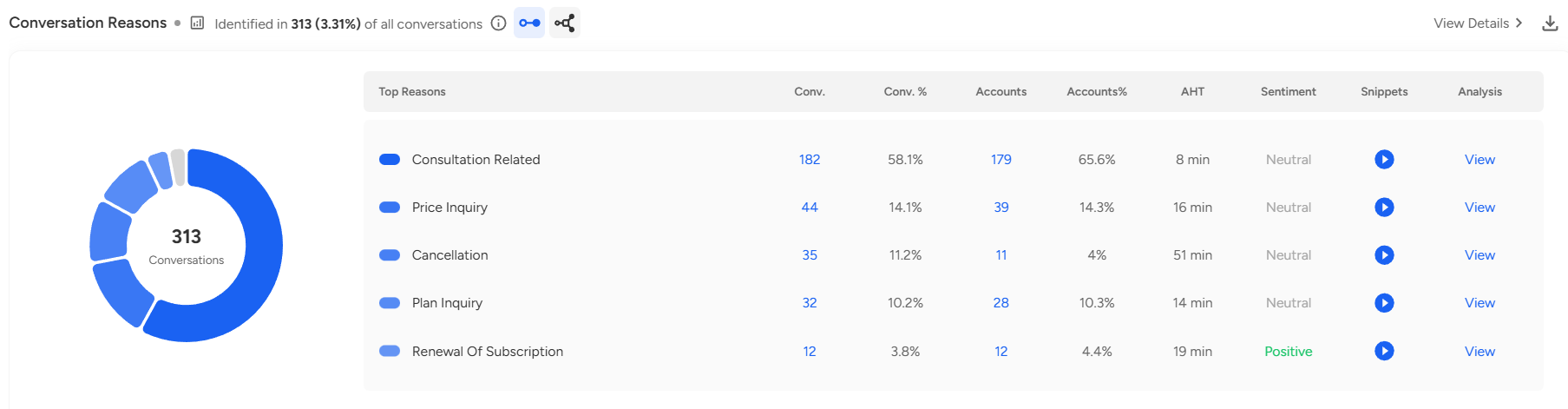 Every card includes:
Top customer behaviors or attributes
Key metrics (intent, objections, interest trends, etc.)
Sentiment & emotional cues
Conversation snippets highlighting customer signals
“View Details” option for deeper analysis
Download option to export insights for reporting or strategy discussions
Option to switch between Single Insight per Conversation and Multiple Insights per Conversation directly on each card
Notes / Uses:
Identify customer buying intent and understand what drives conversions
Track common objections or blockers shared across customers
Monitor sentiment patterns to measure customer experience
Analyze customer journey stages such as evaluation, comparison, or decision-making
Discover emerging trends in expectations, concerns, and feedback
Use insights to improve sales scripts, product messaging, and customer handling strategies
Access both high-level summaries and deep-dive insights for decision-making and coaching
📩 Still need help? Contact our support team at [email protected] —we’re happy to assist!
Good day!