
The Deal Value refers to the total value or amount of a transaction or agreement.
After integrating the CRM with Convin, an organization can easily fetch the deal value within the Accounts Dashboard.
The Deal Value filter in the Accounts Dashboard allows users to search and filter the required dataset based on the assigned sales value of the accounts.
To access the Deal Value Filters for the Accounts Dashboard follow below steps:
- Navigate to Account Icon.

- Click on the "filters".

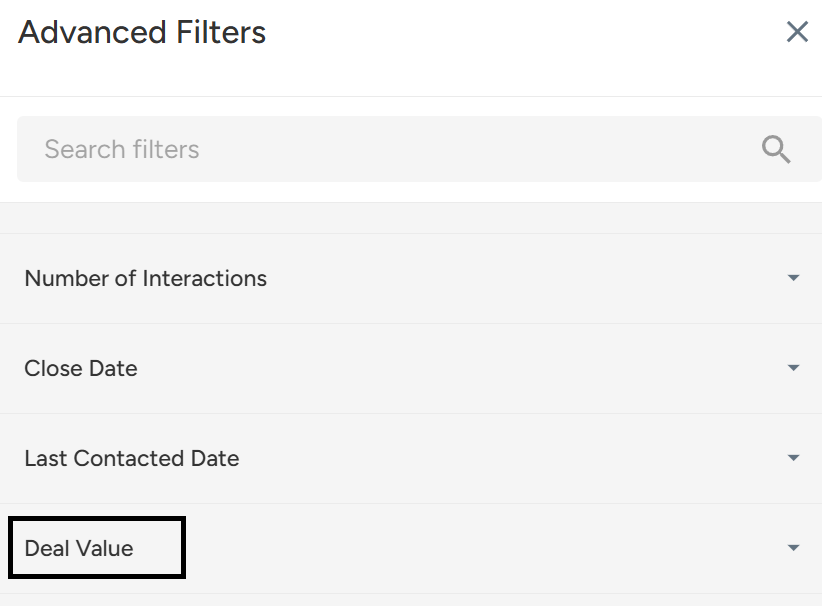
- Once you click on the option, you will see a list of search filters for the particular dataset. Click on "Deal Value".
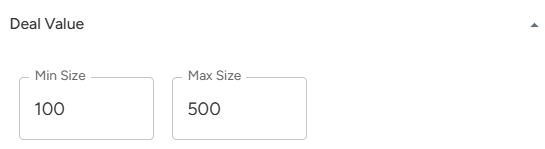
- Enter the minimum and maximum values required to filter the dataset.
- Finally, click on "Apply Filter" to apply the filter and view the results.

Summary:
The Deal Value filter in Convin’s Accounts Dashboard lets you search and filter accounts by their sales value. After CRM integration, you can set minimum and maximum values to quickly analyze deal sizes.
The Deal Value filter in Convin’s Accounts Dashboard lets you search and filter accounts by their sales value. After CRM integration, you can set minimum and maximum values to quickly analyze deal sizes.
Need Additional Assistance?
📩 Still need help? Contact our support team at [email protected] —we’re happy to assist!
Good day!