
Follow the instructions below to log out from Convin.
Locate Your Profile Icon. As shown in the attached screenshot, your profile icon can be found in the top right corner of the Convin dashboard.

Open Profile Menu, click on your profile icon, and a dropdown window will appear, displaying options related to your account.
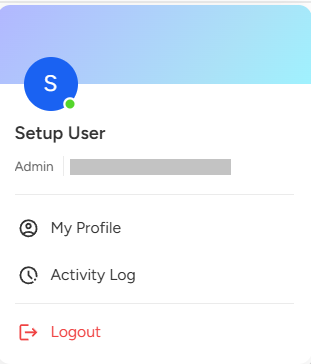
Select the third option labeled "Logout" to securely sign out of your Convin account.
This will immediately log out the user and redirect them to the Convin Login page.
To log out from Convin, click your profile icon located at the top right corner of the dashboard. After clicking, a dropdown menu will appear—select the "Logout" option. This will immediately sign you out and redirect you to the Convin login page. The process is quick and ensures your session is securely closed.
📩 Still need help? Contact our support team at [email protected] —we’re happy to assist!
Good day!