
When a Conversation is uploaded with incorrect details, an inaccurate audit template, or is otherwise deemed unhelpful, it is necessary to remove the Conversation from the Conversations Dashboard to ensure data accuracy and maintain the integrity of the system.
Here are the steps you can follow to delete a conversation from the Convin dashboard:
Go to the "Conversations" page on the Convin platform.

Search the title of the Call in the Search Bar.

You can also take a look at the article Find a Call.Please make sure to verify the call details before deletion, as the conversation cannot be recovered once deleted.
Click on the Action button with respect to the conversation you want to delete.
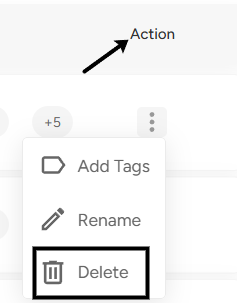
Click on the "Delete" button.
📩 Still need help? Contact our support team at [email protected] —we’re happy to assist!
Good day!