
Filtering conversations by CSAT score offers several benefits, such as:
- Identifying High Satisfaction Conversations: Quickly locate interactions with high CSAT scores to analyze positive feedback and best practices.
- Performance Tracking: Monitor CSAT trends over time to assess overall customer experience and agent performance.
- Targeting Improvement Areas: Focus on conversations with low CSAT scores to identify and address service gaps.
Conversations can be filtered by CSAT score using the Filters menu, where you can set a specific score range to analyze high or low satisfaction interactions.
Navigate to the "Conversation Page".

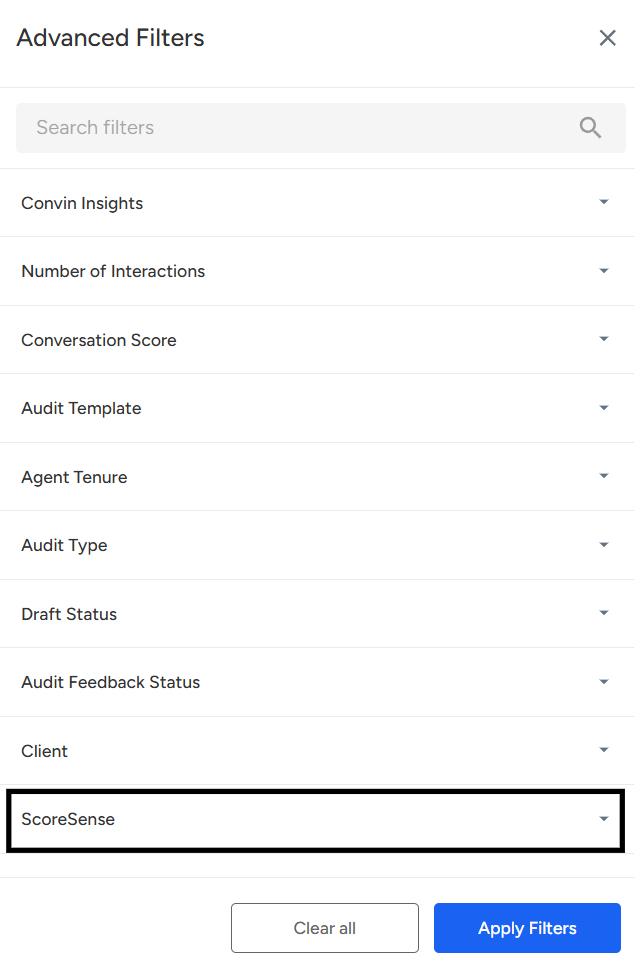
Click on "Filters"

Scroll down and click on "Score Sense."
Under CSAT Analysis, select the desired category (Satisfied/Neutral/Dissatisfied).
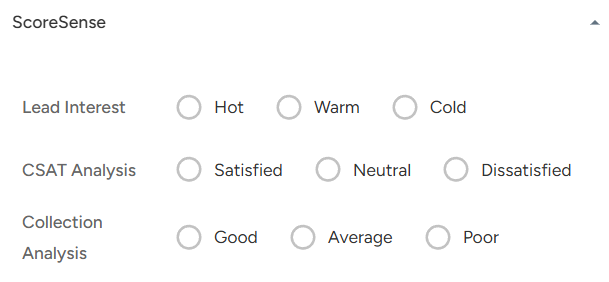
Select Satisfied, Neutral, or Dissatisfied, then click "Apply Filter" to sort conversations by CSAT level.
📩 Still need help? Contact our support team at [email protected] —we’re happy to assist!
Good day!