
Collection teams can use a Collection Score to prioritize conversations more effectively. This score is based on factors like the customer’s payment history, the amount they owe, and their relationship with the company.
By focusing on conversations with higher Collection Scores, collection reps can save time and effort, leading to better outcomes. This approach not only boosts the success rate but also helps reduce overall costs for the team.
To filter the Collection Scores:
Navigate to the Home Page
Go to the Conversation Module

Click on the Filters button

Scroll a bit and search for ScoreSense.
Click on "ScoreSense" and search for Collection Analysis.
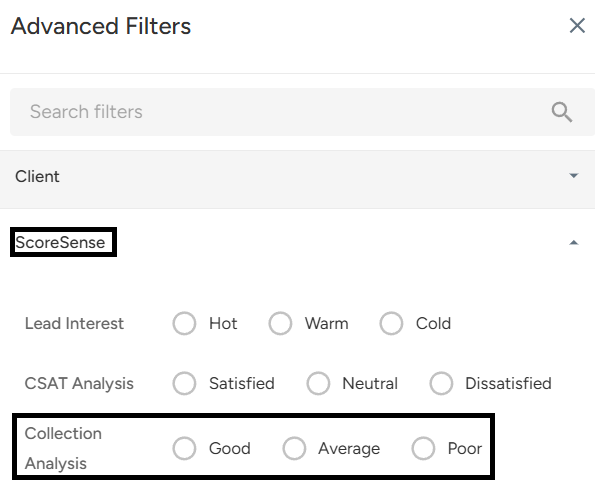
Click on Good, Average, or Poor according to your requirements.

Click on "Apply Filter."
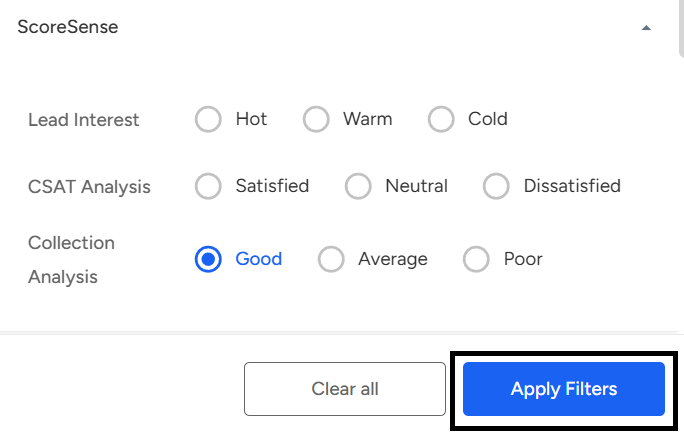
Using Collection Scores helps teams prioritize conversations more efficiently, focusing on those most likely to result in successful recovery. This leads to better outcomes and lower costs. By filtering based on Collection Scores, collection reps can easily target calls categorized by Good, Average, or Poor scores.
📩 Still need help? Contact our support team at [email protected] —we’re happy to assist!
Good day!