
Need to analyze performance or review calls for a particular team member? Convin makes it easy to filter meetings by individual agents, counselors, or sales reps. Here's how:
Step-by-Step Guide to Find an Agent's Calls:
1. Access the Conversations Dashboard
- Log in to your Convin account
- Navigate to Conversations module from the main menu

2. Locate the "All Reps" Filter
- On the Conversations page, look for the "All Reps" dropdown.

3. Select Your Team Member
- Click the dropdown → Search for the agent by name.
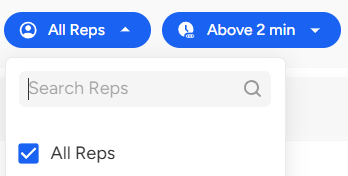
- Upon desired selection, click on the "Apply" button.
4. View Filtered Results
- The system will instantly display only calls handled by your selected agent.
Need Visual Guidance?
🎥 Watch our 1-minute tutorial: https://drive.google.com/file/d/1iCa4-7CIyrfHC5vACOVjWlttyPM8M0jf/view?usp=share_link
📩 Still need help? Contact our support team at [email protected]—we're here to assist you!
Good day! ✨