
Fetching Conversations for a particular team, team leads, or managers is crucial for tracking progress, ensuring effective collaboration, and managing schedules.
Below are the steps to easily retrieve conversation data for specific teams or individuals within your organization:
- The image below displays the Conversation page, which shows calls/conversations for all teams.
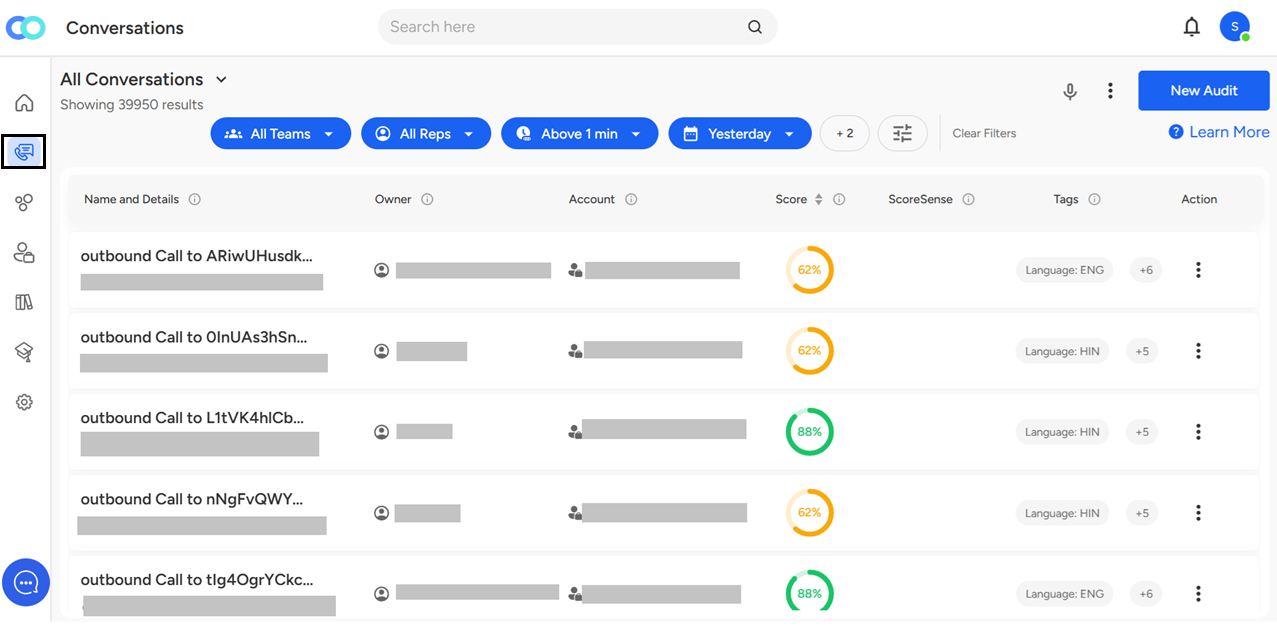
For example, if you have 3 teams across regions and need to track call details for one of them, here's how you can do it.

- Go to the Completed Calls section and look for the dropdown labeled "All Teams." Select the desired team from the dropdown and click Apply to view calls specific to that team.
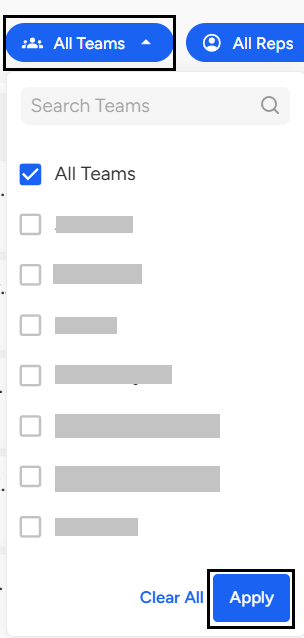
Once clicked, you will see a dropdown menu where you can search call details for an individual team.
These respective teams are also categorized as sub-teams, with an option to select multiple teams at a time; this will help you fetch call details of one or multiple teams at once.
You can easily fetch conversation data for specific teams, team leads, or managers using the "All Teams" dropdown in the Completed Calls section. This allows you to filter call details by individual or multiple teams, including sub-teams—making it easier to track performance and manage collaboration effectively.
📩 Still need help? Contact our support team at [email protected] —we’re happy to assist!
Good day!